Internet
The connection to the outside world.Your Internet service provider (ISP) supplies access to websites, streaming and cloud services. Its plan and connection set limits that new Wi-Fi equipment cannot remove.

06 / Networking
Cameras, streaming, work calls and smart devices all depend on the network. We plan coverage, cable routes and equipment locations around the building—not just the nearest outlet.
Meet the equipmentMore than one way to make it yours.
3 featured modelsNetworking, without the jargon
You do not need to know the lingo to get a better connection. Here is what each part does—and where we can help.
Your Internet service provider (ISP) supplies access to websites, streaming and cloud services. Its plan and connection set limits that new Wi-Fi equipment cannot remove.
Radio signals connect phones, laptops and other devices to your local network. Full signal bars do not guarantee fast Internet. Wi-Fi can stay connected even when the provider has an outage.
LAN means local area network: your home or business network, including wired and wireless devices. A “LAN connection” usually means an Ethernet cable, often useful for TVs, desks, recorders and access points.
A simplified home or small-business layout. Some equipment combines several of these functions in one box.
Router → switch if needed → Ethernet cable → device
Router → access point or mesh system → Wi-Fi → device
The equipment that connects to your provider's cable/DSL or fiber service. ONT means optical network terminal. Your provider determines what is required; sometimes it is part of a combined gateway.
Directs traffic between your local network and the Internet. A home Wi-Fi router often includes an access point and several Ethernet ports. Adding another router needs careful setup to avoid conflicting networks.
Provides Wi-Fi coverage. Installed ceiling or wall access points often connect back by Ethernet. An access point does not replace Internet service, and it is not necessarily a router.
Adds wired network ports so several devices can connect. Think more connection points—not more Internet speed. A switch alone does not create Wi-Fi.
Compatible equipment can receive data and electrical power through one Ethernet cable. Useful for access points and cameras. PoE, PoE+ and PoE++ have different capabilities; device requirements and the switch's total power budget must match.
The link carrying traffic from an access point or mesh unit back toward the main network. It can be wired or wireless. Ethernet backhaul can reduce the need to relay traffic over Wi-Fi.
Mbps describes data-transfer speed; latency is delay, which matters for calls and gaming. Coverage is where a usable signal reaches. Download, upload and Wi-Fi signal strength are different measurements—not interchangeable promises.
Mesh describes a coordinated multi-unit Wi-Fi system. It does not mean every connection must be wireless, and it is not an Internet subscription.
Useful where new cabling is difficult. Units still need power and a good link to each other; putting one deep in a dead zone may not help.
A good option when cable is available: coordinated Wi-Fi coverage with less reliance on wireless relay links. Configuration depends on the system.
Useful for planned home and business installations. Placement, cabling, management and PoE power are designed together. Client devices still connect wirelessly.
UniFi U7 Pro and eero PoE 6 show two installed-coverage options. We select placement, power and the supporting network—not just a device with a bigger speed number.
Explore Wi-Fi equipment ↗UniFi Lite 8 PoE adds Ethernet ports and powers selected compatible devices. Port speed, power per device and total power budget all matter.
Explore switches ↗Manufacturer explanations
Tech Savvy
Equipment is one part of the project. We plan, install and configure the connections around how you use the space.
Look at weak spots, building layout, connected devices and the provider connection before recommending changes.
Plan cable routes and wired connections for desks, TVs, recorders and access points; assess existing cable before reusing it.
Select and place compatible equipment, configure the network and check coverage in the areas that matter.
Set up switches and suitable PoE power, connect devices, and configure guest Wi-Fi where the equipment supports it.
Internet service is purchased separately from your provider. Final equipment and work depend on a site assessment. We do not promise a particular speed, coverage area or outage-free connection.
Let's plan your network ↗Browse by product type
A closer look
Compare the options below. We confirm availability, compatibility and the right configuration for your project.
Coverage planned around the building and the devices you use.

Ceiling-mounted Wi-Fi 7 access point
A low-profile access point for a planned network with coverage placed where it is useful, rather than wherever a desktop router happens to sit.
Homes and businesses needing a coordinated installed network.
Requires suitable PoE+ power, network equipment and UniFi management. Wi-Fi 7 / 6 GHz benefits require compatible clients; real performance varies with the building and network.
Manufacturer details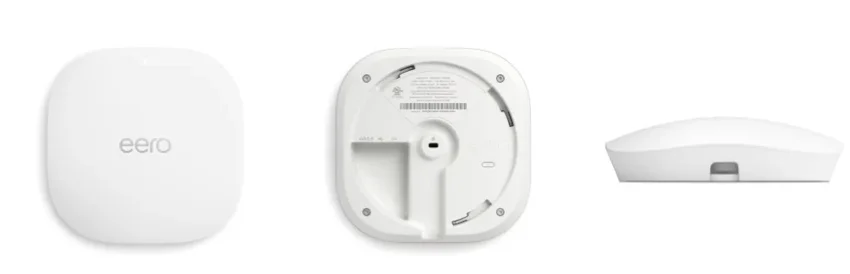
Installed Wi-Fi 6 coverage
Bring eero coverage to a ceiling or wall location with a cable-powered access point and app-based network management.
Homes where discreet installed equipment and everyday app control are a good fit.
Requires compatible power and network setup. Coverage depends on construction and placement. Internet service is separate; optional subscription features are not included by default.
Manufacturer detailsThe wired connections and power behind an installed network.
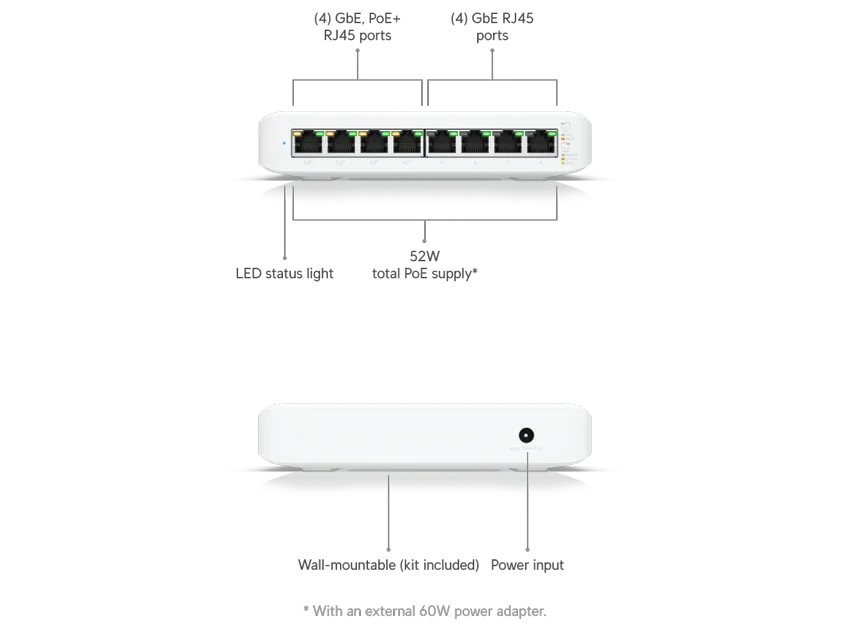
Wired network switch
Connect several wired devices and power suitable access points or cameras from a compact network switch.
Small networks needing more wired connections and selected PoE devices.
52W total PoE budget with the specified adapter. Match each device and the combined load. PoE+ is not PoE++: this switch cannot supply the V729 PoE++ floodlight through PoE. It is not an internet router.
Manufacturer detailsIt may improve local coverage and performance, but it cannot exceed the limits of your internet service or connected devices. We look for the actual bottleneck first.
It is a device that provides Wi-Fi coverage. Many installed systems use several strategically placed access points connected to the network by cable.
Your space. Your possibilities.
Tell us what you want to protect, enjoy or simplify. We’ll help choose the right equipment and plan the installation.